✨ NEW ON SHOPIFY APP STORE

Pro product photos
+ SEO in 1 click

Piklum removes backgrounds from your product photos and generates SEO-optimized alt text — across your entire catalog. No Photoshop, no manual writing.

✓ Free plan (20 photos/mo, no card) • ✓ 7-day trial on paid plans • ✓ Cancel in 1 click
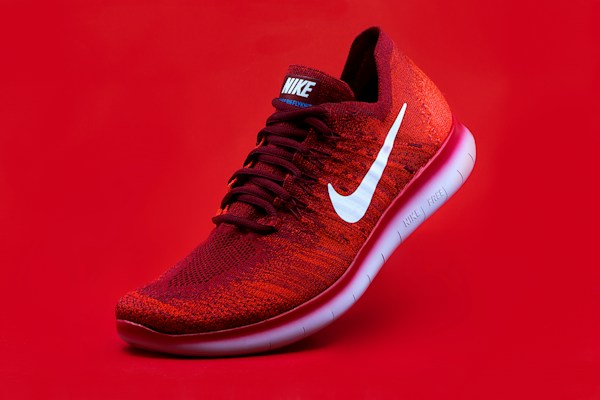
Piklum preview
Red Nike sneaker
✨ ENHANCED BY PIKLUM 4 seconds ago
GENERATED SEO ALT TEXT

"Nike Free RN Flyknit red sneaker with translucent sole and white swoosh"

🖼️ Transparent PNG · 🌍 Multi-language · 💾 Saved to Shopify

~4s
per photo, in parallel
3 min
for 500 photos in one batch
AI
product-aware alt text
1 click
for your entire store

How Piklum works

3 steps. No design skills required.

1
🖼️

Automatic background removal

Piklum removes the background from every product photo in seconds. Clean transparent PNG output, pro quality. No more hours in Photoshop.

2
✏️

Product-aware SEO alt text

Every photo gets an SEO-optimized alt text using your product's specific vocabulary (e.g. "ski wax" gets described as "ski wax", not "soap"). Better Google Images ranking.

3

1-click batch processing

Select your products, click once. Piklum processes everything in parallel and writes results directly to your Shopify products. History and rollback included.

Simple pricing that fits your store

Start free with 20 photos/month. 7-day trial on paid plans. Cancel in 1 click.

Piklum Free

Test Piklum with no commitment

$0 /mo
  • 20 photos / month
  • Automatic background removal
  • SEO alt text generation
  • History + rollback
  • Community support
Start free

Piklum Starter

For testing Piklum and small stores

$29 /mo
  • 100 photos / month
  • Automatic background removal
  • SEO alt text generation
  • History + rollback
  • Email support
Get started
⭐ POPULAR

Piklum Growth

Best value for growing stores

$79 /mo
  • 500 photos / month
  • Everything in Starter
  • Unlimited batch processing
  • Priority processing
  • Priority support
Start with 7-day trial

Piklum Pro

For large catalogs

$199 /mo
  • 2000 photos / month
  • Everything in Growth
  • API access (V2)
  • Advanced analytics
  • Dedicated support
Get started

Frequently asked questions

Does Piklum replace my original photos?

No. Piklum adds the enhanced photo to your Shopify product without touching the original. You can compare and choose which version to display. If you want to undo anything, the history + rollback feature lets you remove any Piklum-added photo in 1 click.

How does the SEO alt text generation work?

For each photo, Piklum generates an SEO-optimized alt text using product-specific vocabulary (e.g. "ski wax" gets described as "ski wax", not "soap"). The alt text is automatically saved to your Shopify product page.

How long does it take to process 500 products?

About 3 minutes. Piklum processes photos in parallel (up to 5 concurrent). Select your products, click once, and Piklum handles the rest. You can close the app — processing continues in the background.

How does the free plan work?

Install Piklum, choose the Free plan — no credit card required, ever. You get 20 photo enhancements per month, resetting each month. Upgrade to a paid plan anytime from your admin if you need more volume.

How does the 7-day trial on paid plans work?

Install Piklum, approve the subscription, and access all features for 7 days without being billed. Cancel before day 8 and you pay nothing. Otherwise, billing starts on day 8, managed directly by Shopify.

Can I change plans anytime?

Yes. Upgrade or downgrade from the Subscription screen in the app. The new rate applies at your next billing cycle.

Ready to modernize your product photos?

Install Piklum on Shopify. Start free with 20 photos/month. No credit card required.

🛍️ Install Piklum on Shopify

Built by Ange Labs • Compatible with all Shopify stores